THE TOP TEN MISCONCEPTIONS ABOUT COMPUTERS
1) Memory vs. memory (RAM memory vs.
Hard Disk memory).
Many people confuse RAM with Hard Disk space. RAM (Random Access Memory) consists of ICs (Integrated
Circuits) containing millions of tiny transistors that are usually made of silicon. (The
ICs are
the black rectangular parts shown below soldered to the green printed circuit board.
The printed circuit board itself is
about the size of a flat cigar.)
RAM:
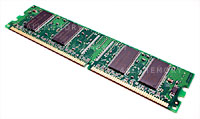
RAM is used to process data, make calculations, and create the picture you see on your monitor. The results
of this processing and data manipulation are then stored
long-term on the hard drive, because RAM loses the data it contains when you turn off the
computer.
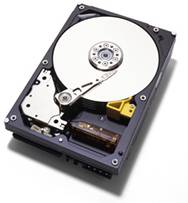
Hard disks are made of spinning glass or aluminum platters inside a
rectangular metal box. (See # 3 below for a picture of a hard drive.) A hard
drive is used to store your data and programs magnetically on the surface of the
platters. These platters spin at about 5,000-15,000 rpm. The data is read by the
tiny “pickup” heads that swing across the surface of the platters in an arc. The
data is saved even if you turn off the computer, because it is saved
magnetically. The hard disk can store thousands of times more data than RAM, but
is much slower at saving it or serving it up because it is a mechanical
device and not an electrical one.
RAM is analogous to your kitchen sink. It’s where you wash the dishes
(process data). The Hard Drive is analogous to your water tank or your city’s
water reservoirs. It stores the water used to wash your dishes in your kitchen
sink. If your kitchen sink is larger, you can wash your dishes more easily and
faster. (If you have more RAM, you can process data faster and more reliably.)
If your water tank (Hard Drive) is larger, it can hold more water (data and programs) and
makes for a much more pleasant (computing) experience.
2) E-mail addresses vs. Web site addresses
An e-mail address always has an “@” symbol in it, such as
"[email protected]". A web site address never does. A web site address usually has the form:
http://www.microsoft.com/
www.microsoft.com
http://www.pbs.org/
http://www.cornell.edu/
http://www.irs.gov/
nytimes.com (you don’t need to type the “www” in most cases)
3) “Hard Drive” does not mean that box on the floor
or on your desk which contains the guts of the computer.
The term, “hard drive,” refers to the part inside the box that stores your data
and programs magnetically (as explained in item # 1 above), and is often mistakenly used to refer to the “tower”
(that box on the floor or on your desk that contains the Pentium chip, RAM,
etc.) or computer itself.
“CPU,” or Central Processing Unit, or “computer,” is a better way to refer to
this box.
Here’s a picture of a hard drive, which is about the size of a really thick
credit card for laptops, and the size of a small paperback book for desktops, with the top
metal cover removed so that we can see the platters and pickup arm inside:
Hard drive:
4) Files vs. Folders
A folder is like a physical manila folder that you may have on your
real desktop (as in furniture). That’s why it has an icon that looks like a manila folder. A
folder can contain many documents and files inside.
A folder:

A file is one such document, such as a letter, fax, e-mail message,
tax return; a picture; a piece of music; a video clip; or a piece of a program,
such as for America Online or Microsoft Windows. It usually
has an icon of a piece of paper with a dog-ear in the upper right-hand corner.
A file: /
A folder can contain many files in it, but the reverse cannot be true
(with some exceptions). So, a folder should be considered the container, while a
file should be considered the “containee,” in most cases.
Programs can consist of many files. Microsoft Windows, for example, has
thousands of files. Some of these files link your computer to the Internet, or
allow the computer to recognize and use certain hardware, such as the CD-ROM
Drive or the hard drive. Other Windows files show you the background
picture on the “desktop” or create certain sounds when you open programs or
perform certain tasks on the computer.
5) Windows vs. Word (or Office)
Many novices confuse Microsoft Windows with Microsoft
Word (or Microsoft Office). Microsoft Windows is the
“operating system” or program that allows you to click on icons and save your
data and programs in files and folders. Your computer would be a very large
paperweight without some kind of operating system. The other competing
operating systems for personal computers are the Apple
Macintosh operating system and Linux, the free operating system.
Microsoft Word is just a word-processing program. It allows you to
create letters and print them out. Microsoft Office is the Microsoft software program that bundles
Microsoft Word with Microsoft Excel (the spreadsheet program),
Microsoft PowerPoint (the slide
show-creating program) and Microsoft Outlook (the e-mail program favored by
businesses).
6) Disk vs. Disk (Floppy Disk vs. CD or DVD Disk)
Another source of confusion is the difference between floppy disks and CDs or
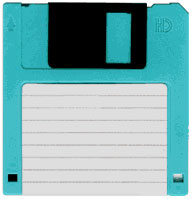
DVDs. A floppy disk is one of those thin rectangular plastic parts that can fit
in the palm of your hand. It has a silver or black metal, sliding cover that conceals a
very thin plastic disk about 3 inches in diameter (just like a hard disk
platter, but much thinner and more flexible) where your data
is stored magnetically. A floppy disk
can only store about 1.4 Megabytes, so it won’t even store a single large,
high-resolution photo from a Digital Camera. (See # 10 below.)
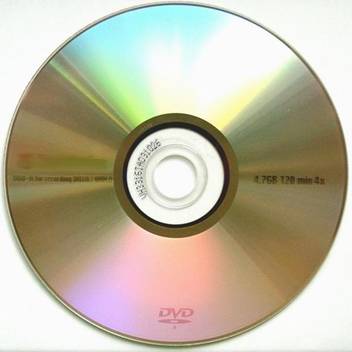
A CD can store up to about 650 Megabytes of data, so they are much more useful
than floppy disks, which aren’t used too much anymore.
A DVD can store up to about 8.5 Gigabytes of data (and soon about
200 or more Gigabytes of data). This is why DVDs are used for movies; they can easily store a
2-hour movie if the frames in the movie are compressed. A DVD is the same physical size as a CD, but can hold much
more data because the laser used to punch holes in the aluminum layer inside
the polycarbonate disk uses light of a much smaller wavelength.
Floppy disk:
CDs and DVD disks:
7) Downloading vs. Copying (or Installing)
Downloading and copying are often mistaken for each other. Downloading is the
process of transferring data or programs from a large computer (such as America Online’s) to a smaller computer (i.e., your computer).
Downloading should
not be used to refer to the process of transferring data or programs from a
floppy disk, CD or DVD disk to your computer. If what you are transferring is
data, then you should use the term, “copying.” If you are installing a program
from a floppy disk, CD or DVD, then the correct term is “installing.”
8) Spyware vs. Anti-spyware
There seems to be some confusion as to what spyware is and what anti-spyware
is. Spyware (also called “adware” or “malware”) is a hidden program downloaded
into your computer that tracks where you go on the Internet and reports this
information to certain marketers or hackers. (This is not exactly the same as a
virus.) You can get these pesky programs,
which are sometimes impossible to remove, by visiting certain web sites or
downloading and installing certain “free” games or programs. Some spyware just increases the
number of pop-up ads you see, or changes your search page, or adds additional
toolbars to your web browser. Other spyware is more dangerous; it can open the
floodgates and allow so much spyware on your computer that you’ll have to hire a computer consultant to completely erase your hard drive and
reinstall Windows and all of your favorite programs. And there are even
spyware programs that record your keystrokes and then sends this information to some
hacker over the Internet, allowing him or her to see your passwords, credit card numbers and other
private information. (These programs would more closely fit the classical
definition of a virus.)
Anti-spyware is software that prevents spyware from doing all of these
damaging things, or removes or blocks spyware from your computer. Some
anti-spyware programs such as Ad Aware or SpyBot are free;
others such as Spy Sweeper or Spyware Doctor cost money, but
generally work better than the free ones. Human nature being what it is, there
are also anti-spyware programs that purport to help you get rid of spyware, but
are actually harmful
to you and your privacy. (Be wary of what links and buttons you click
on and what programs you download!)
So, the bottom line is: spyware = bad, anti-spyware = good.
9) Computer Viruses – natural or artificial?
Many people think that computer viruses are like natural viruses, such as
the flu viruses, or viruses that cause
herpes or cancer. They think that computer viruses just
spontaneously appeared on the scene when personal computers were invented.
Actually, computer viruses are (usually) small programs that hackers write to make the
world more difficult and trying for the rest of us. In the old days, hackers just wanted to
see how many computers they could infect, but now there is more than likely a
financial motive for them to create viruses. These cyber-jerks are trying to take
over as many computers as they can, to send out thousands of junk e-mail
messages inviting you to buy
Viagra, invest in certain stocks, make lots of money allowing complete
strangers to use your bank accounts, or visit certain pornographic web sites.
These hackers are paid by the people who create these web sites. There are viruses
that steal your passwords and/or record your keystrokes and then sends this data
to hackers or to unscrupulous gangs of Internet thieves. It’s a good idea to
install anti-virus and anti-spyware programs on your computer and keep them
up-to-date with the latest list of viruses (there are about 10 new viruses
introduced to the world every day) and the latest list of spyware, scam web sites and programs that
steal your passwords.
10) Gigabytes, Megabytes, Bytes and Bits
Bits = the zeroes (0) and ones (1) that make up data and
commands in the computer world. The millions of transistors in computer chips
can only be in two states: on or off (one or
zero). So every number and all of your data and program files have to be translated into the binary
numbering system first before they can be processed by ICs.
Byte = a group of 8 bits, which is like a “word” in the
computer world.
Kilobyte = one thousand bytes (a typical Microsoft Word
document might be about 20 Kilobytes large).
Megabyte = 1 million bytes (a large, high-resolution photo
taken with a Digital Camera might be 20 Megabytes big).
Gigabyte = 1 billion bytes (a modern operating system like
Windows XP might be 1.5 Gigabytes large or even larger with all of the features built into it, such as Internet Explorer, Outlook Express,
Windows Media Player, etc., etc.).